Present your company
Add a description, photos and an address with a point on the map. Separate service and staff photos help someone understand your offer before their first message. Publish when the information is ready.
Show your services, team and location, let a customer choose a convenient time and answer their questions in the same messenger. In GoMsg, the company profile, booking and conversation are connected. Customers get a clear path to a service; providers get a workspace close to their conversations.
The web client will open. Sign in or create an account to start chatting.
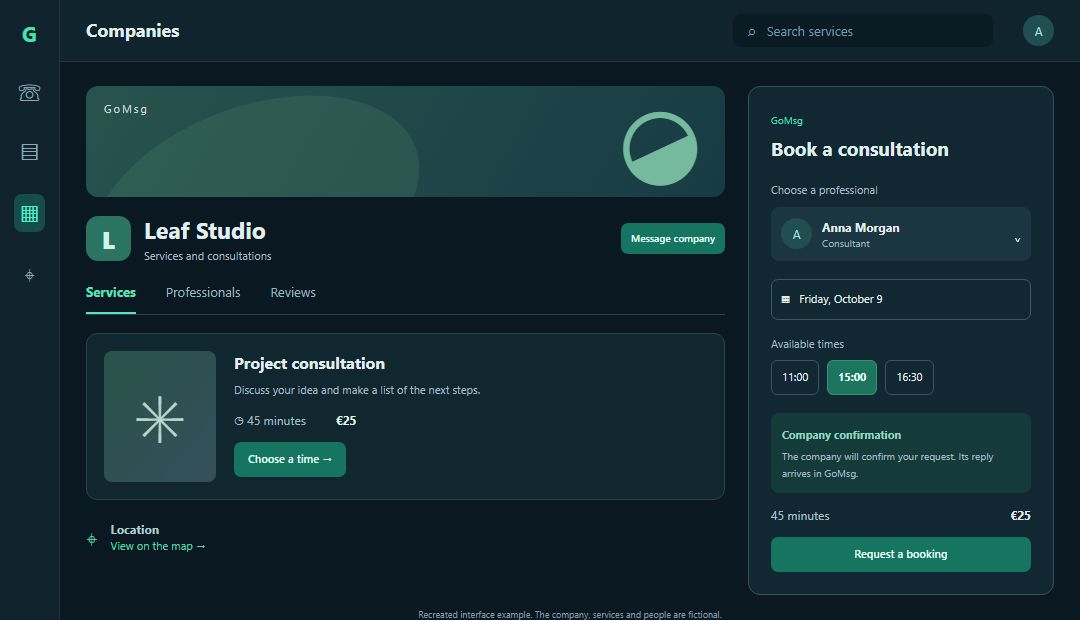
A studio adds a consultation with a photo, duration and price, selects the specialist and sets working hours. A customer finds the service in the catalogue, views its details and chooses a time. If they need clarification, they message the company. A staff member replies under the company identity and can choose to display their name.
Add a description, photos and an address with a point on the map. Separate service and staff photos help someone understand your offer before their first message. Publish when the information is ready.
Configure services, durations, breaks and available specialists. Choose instant booking, approval or a manual process. You can account for shared resources such as a room or equipment.
Customers message your company in GoMsg and the team replies under its identity. Show the staff member’s name when appropriate. Linked groups and channels offer separate spaces for customer discussion and company news.
Customers can leave a company rating and review, and the owner can reply. The profile shows an average rating and review count. A verified booking is marked separately.
Create the company, add its working location and list services. Upload photos to explain what you provide instead of showing only a list of names.
Add specialists, choose working days and hours, and configure booking rules. Account for exceptions and time blocks when appointments are unavailable.
Publish the profile in GoMsg’s catalogue. Check bookings, reply to customers and connect your website widget to the company if needed.
Search the catalogue for companies, individual services and classified listings using filters. An address and map location help evaluate the place. An independent provider can publish a listing without creating a company.
If your business has a website, a linked widget receives enquiries from it. The business area groups conversations by company and source. A widget can also work independently without a company profile.
Yes. Sign in to use search and booking, subject to business-module access on your selected server. A visitor messaging your website widget does not need a GoMsg account.
Yes. Company settings support services on-site, at the customer’s location and online. Select the relevant format and explain its conditions in the service description.
You can display a price and currency. This does not provide built-in payment processing, invoicing or accounting; agree on payment arrangements separately.
Currently it is a profile inside GoMsg. It helps users of the service discover your offer; a separate publicly indexed company website is not promised.
Sign in or create an account. If your selected server grants business-module access, start with a company and one service.